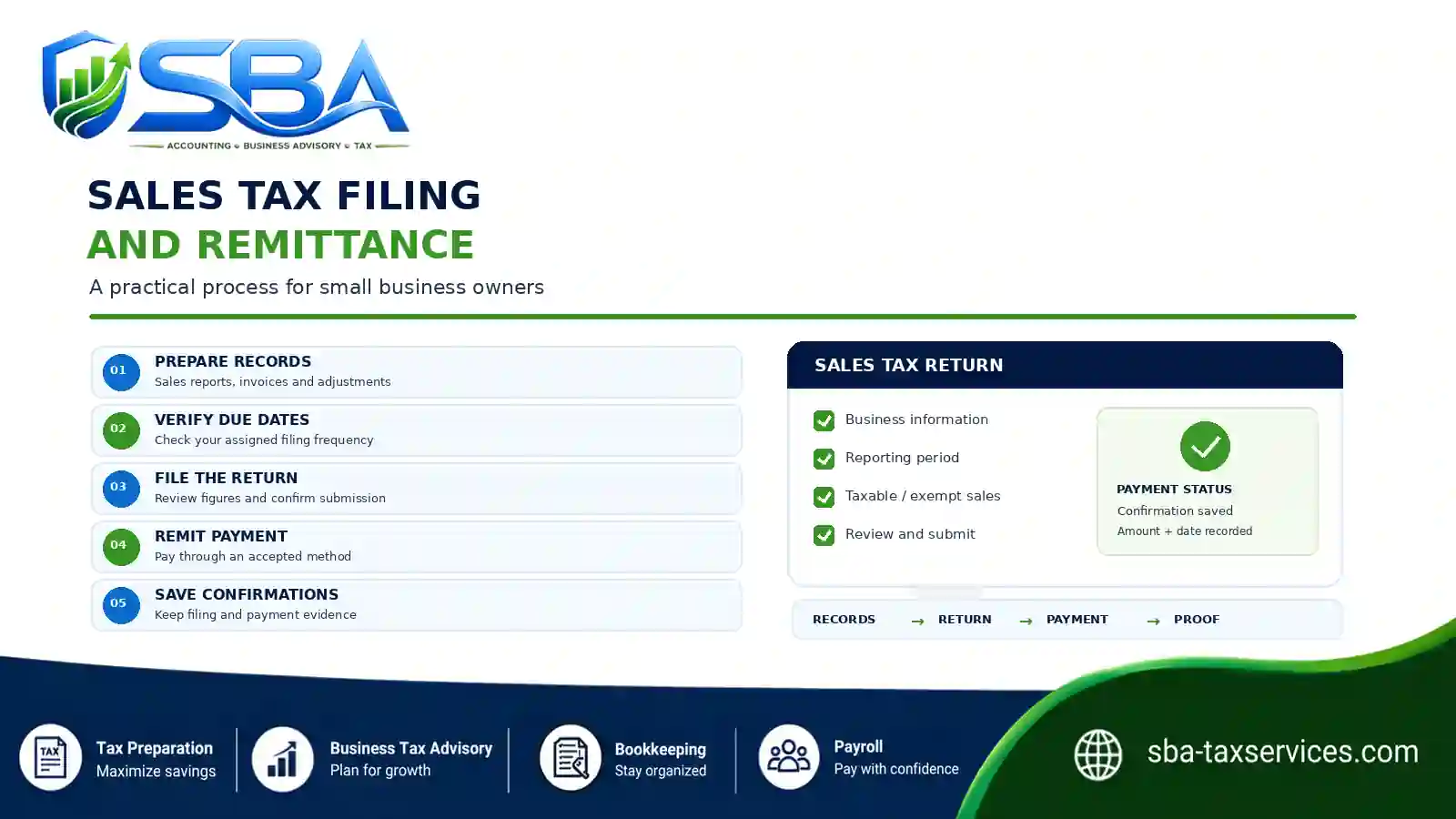
Sales tax filing and remittance are related responsibilities, but they are not always the same task. Filing means reporting the required sales and tax information to the appropriate tax authority; remittance means paying the amount due. Even when a portal combines both steps, business owners should confirm that the return was accepted and the payment was completed.
A reliable process starts with accurate records, a verified due date, and a review of the return before submission. Afterward, save evidence of the filing and payment, then update the next due date. Because deadlines and procedures vary by jurisdiction and account, always follow the current instructions for your business.
In This Guide
Jump to the section you need. Each item opens the matching part of this article.
02Prepare the Return↗
03Verify Deadlines↗
04Submit and Pay↗
05Common Mistakes↗
06Filing Checklist↗
07Frequently Asked Questions↗
What Are Sales Tax Filing and Remittance?
Sales tax filing is the process of reporting required sales and tax information to the relevant state or local tax authority. Depending on the rules and your business activity, the return may ask for taxable sales, exempt transactions, tax collected, adjustments, and other details.
Remittance means paying the sales tax owed. In short, filing reports the information; remittance pays the liability. Some tax systems combine these steps in one online workflow, while others require separate actions or payment arrangements. Therefore, check both statuses even when you complete the tasks in one sitting.
For example, Virginia Tax’s retail sales and use tax guidance explains its filing options and due-date rules. California also provides state-specific information through its sales and use tax guidance. These examples illustrate why business owners should follow the instructions for their own tax account rather than assuming every state follows the same process.
Why Filing and Remittance Need Separate Checks
Even when you prepare the return and payment together, verify each step independently. For instance, a return may go through while payment remains pending. A payment may also be scheduled while the required return remains incomplete. In other cases, the payment amount may differ from the amount reported.
A two-part review helps you identify incomplete tasks before the deadline. It also creates a clearer record of what you submitted, what you paid, and when each action occurred.
Step 1: Prepare Records Before Sales Tax Filing
Before opening the tax portal, organize the records you need for the reporting period. Depending on your business and jurisdiction, gather:
- Sales reports, invoices, and receipts
- Taxable and non-taxable transaction details
- Exemption documentation, where applicable
- Sales tax collected and supported adjustments or credits
- Purchase records relevant to use tax or other required reporting
- Prior return information and records of payments or prepayments, where relevant
Next, reconcile sales reports with your accounting records and point-of-sale or payment-processing reports. If the figures do not agree, investigate the difference before submitting the return. Keep supporting documents organized by reporting period and jurisdiction so you can retrieve them quickly.
For the broader compliance process, read our Sales Tax for Small Businesses: A Beginner’s Guide. It covers the wider sequence of determining obligations, collecting tax, recording transactions, filing, and remitting.
Step 2: Verify Sales Tax Filing and Payment Deadlines
Sales tax schedules are not universal. A tax authority may assign monthly, quarterly, annual, or another filing frequency based on its rules and your circumstances. Therefore, do not rely only on a date remembered from a previous return. Check the current instructions and the filing frequency assigned to your account.
For example, Virginia Tax says that its registered dealers generally file monthly or quarterly, with returns due on the 20th day of the month following the filing period. That is a Virginia-specific rule, not a nationwide deadline. The relevant authority may also provide special instructions for weekends, holidays, prepayments, or account changes.
- Confirm the reporting period and assigned filing frequency.
- Check the current return due date and any separate payment due date.
- Review accepted payment methods and cutoff times.
- Check prepayment rules and instructions for weekends or holidays.
- Confirm whether you must file when there are no sales or no tax due.
A saved calendar helps you plan ahead; however, it should not replace official verification. Review the schedule when the authority sends a notice, changes your filing frequency, or updates the instructions for your account.
Step 3: Prepare and Review the Return
Once you confirm the records and due date, prepare the return using the required form or online system. Enter the requested information, then compare the return figures with your supporting reports. In particular, check the reporting period and confirm that taxable sales, exemptions, adjustments, and tax amounts match the records.
- Correct business and tax account
- Correct reporting period
- Complete sales information and supported exemptions
- Correct calculations under the applicable rules
- Consistency between the return and supporting reports
- Required schedules and additional information
If the figures do not reconcile, pause and investigate rather than submitting an unexplained difference. Likewise, if you are unsure how to report a transaction, consult the relevant jurisdiction’s guidance or seek qualified assistance.
Step 4: Submit the Return, Pay, and Confirm Both
Submit the return and check acceptance
Submit the return through an accepted method for your account. However, do not treat clicking “Submit” as proof of acceptance. Review the portal’s response and save any submission receipt, confirmation number, or status message. If the system reports an error or rejects the return, follow the instructions, resubmit if needed, and confirm the final status.
Pay the amount due and verify payment
Follow the tax authority’s payment instructions. Some systems include payment in the filing workflow; others require a separate step. Before authorizing payment, compare the amount due with the return and review any applicable cutoff times.
Then use an accepted payment method and check the resulting status. If you schedule payment for a later date, record that date and verify that the payment completes. Keep the payment confirmation, reference number, amount, date, and reporting period. Finally, reconcile the payment with your accounting records and bank activity when the transaction appears.
Track the return and payment as two separate checklist items—even when the tax portal combines them. This helps you spot an incomplete submission, pending payment, or missing confirmation.
Step 5: Maintain a Sales Tax Calendar
A sales tax calendar turns filing and remittance into a repeatable routine. For each reporting period, record the start and end dates, return due date, payment due date where applicable, internal preparation date, return status, payment status, confirmation numbers, and follow-up tasks.
Whenever possible, set an internal preparation date before the official deadline. That gives you time to gather missing records, resolve discrepancies, and address portal or payment issues. Also review the calendar when the business receives a notice, changes filing frequency, registers in another jurisdiction, or receives updated instructions.
Common Sales Tax Filing and Remittance Mistakes
- Confusing filing with payment. A submitted return does not necessarily prove that you paid the amount due. Verify both statuses.
- Using an outdated due date. Check the current filing frequency and official instructions for the period.
- Filing before reconciling records. Compare the return with supporting documents and resolve unexplained differences first.
- Assuming a scheduled payment is complete. A payment can remain pending or fail. Check its final status.
- Forgetting a required return. Some jurisdictions require returns even when there are no sales or no tax due. Verify your account’s rules.
- Failing to save evidence. Store submission and payment confirmations with the related reporting period.
- Applying one state’s rules everywhere. Due dates, filing frequency, payment methods, and instructions vary by jurisdiction.
Sales Tax Filing and Remittance Checklist
Use this checklist for each reporting period and adapt it to the rules for your account.
- Confirm jurisdiction, reporting period, and current due dates.
- Gather sales reports, invoices, and supporting documents.
- Reconcile sales and tax figures; review exemptions and adjustments.
- Confirm the amount to report.
- Submit the return through an accepted method and confirm acceptance.
- Save the submission receipt or confirmation number.
- Pay the amount due using an accepted method and verify payment status.
- Save payment confirmation and reconcile the transaction.
- Store the return, supporting records, and confirmations together.
- Update the calendar with the next due date.
- Follow up on rejected returns, pending payments, or unresolved differences.
Frequently Asked Questions
What is the difference between sales tax filing and remittance?
Filing means submitting the required tax return. Remittance means paying the tax owed. Although these steps may occur through one system, verify that you completed both obligations.
Are sales tax deadlines the same in every state?
No. States and other relevant jurisdictions can set different filing frequencies, due dates, payment rules, and procedures. Confirm the instructions for your specific tax account.
Do I need to file if my business had no sales?
That depends on the jurisdiction and your filing requirements. Some tax authorities require a return even when there are no sales or no tax due. Check the official instructions rather than assuming a return is unnecessary.
What records should I keep after filing?
Keep the filed return, supporting sales reports, relevant invoices and exemption documents, payment confirmation, submission reference numbers, and related notices. Organize them by jurisdiction and reporting period, and follow applicable retention rules.
What if my payment is pending or rejected?
Review the tax authority’s payment status and instructions. If the payment has not completed, follow the appropriate steps to resolve it and verify the final result. Retain any error message, confirmation, or correspondence related to the issue.
Can accounting software help with sales tax filing?
Accounting software can help organize transaction data, prepare reports, and support reconciliation. However, you remain responsible for following the applicable filing, payment, and recordkeeping requirements. Verify the information and submission status instead of relying solely on an automated calculation.
Build a Repeatable Sales Tax Filing Process
Sales tax filing and remittance become easier to manage when you follow a clear routine. First, prepare and reconcile the records. Next, verify the applicable due date, submit the return, and confirm acceptance. Then pay the amount due and retain evidence of the payment.
Because requirements vary by jurisdiction, use current official instructions for each account. In addition, maintain a calendar and review the process regularly so that filing and payment tasks do not depend on memory alone.
Make Recurring Accounting Tasks Easier to Manage
SBA Accounting and Tax Services PLLC supports small businesses with bookkeeping and business tax advisory services to help organize financial records and recurring accounting responsibilities.
Explore the service options that fit your business needs.
Explore Our Bookkeeping Services
You can also review Business Tax Advisory Services or the sales tax beginner’s guide.
This article provides general educational information, not individualized tax or legal advice. Sales tax obligations vary by jurisdiction and business circumstances. Confirm current requirements with the relevant tax authority or a qualified tax professional.